Table of Contents
Your Google Ads budget is up. Reports look busy. Yet booked calls stay flat — and nobody can name where the money went. That is not a creative problem first. It is a waste problem: clicks that cannot become a job in your service area or offer, or clicks that never become measurable enquiries because tracking and landing paths fail.
This wasted Google Ads spend checklist is for owners and growth leads of service businesses — home services, trades, clinics, professional firms — across the US, UK, AU, CA and NZ. It is owner-runnable in one working session. No tool spam. No fake “saved X%” claims. Illustrative patterns only. Run it before you raise budget, open broad match wider, or blame the channel.
You will leave with a clear definition of waste for services, a 15-point checklist, a one-session workflow, tracking-before-bids guidance, and a prioritisation path by booked-call impact. Soft next steps: a Growth Diagnostic or the 90-Day Lead Engine when the leaks are structural.
What “wasted spend” means for services
For service businesses, wasted spend is money spent on people you cannot or should not serve — wrong geography, wrong job type, DIY or how-to intent, job-seekers — or money spent on people who might have been good fits but never became measurable enquiries or booked calls because conversion tracking, call paths or landing pages broke the chain.
That definition is stricter than “low CTR” or “high CPA.” A click with a strong CTR that lands outside your radius, asks for a service you do not offer, or rings a number that never reaches the diary is still waste. ClickOptimo’s north star for Google Ads for service businesses is booked, qualified demand — not vanity volume.
Waste vs necessary learning spend
Not every non-converting click is waste. Early tests, new match types, and thin data need some learning spend so the account can see what books. Necessary learning has a hypothesis, a time box, and a stop rule. Waste is repeating known losers — DIY themes you already negative-listed last month, postcodes you do not cover, display inventory you never meant to buy — without a decision.
Label learning clearly in the report. If a theme has had a fair window and still cannot produce sales-accepted bookings, it graduates from “learning” to “leak.” Then cut or rewrite. Do not keep funding it because the dashboard looks busy.
The 15-point wasted-spend checklist
Work these in order. Tick what is clean; flag what needs negatives, settings changes, or a pause. Treat this as a weekly ops checklist, not a one-off theatre deck.
Ops rule: Export → tag themes → batch negatives → confirm geo and schedule → only then argue about bids. Do not “optimise” on a leaking search-terms report.
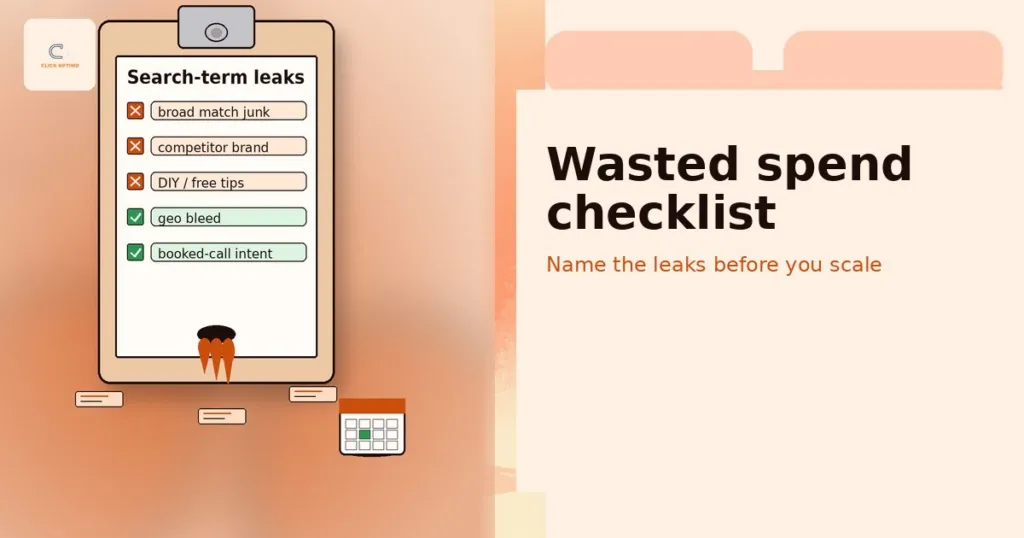
- Search terms waste themes — Pull a recent sample. Tag DIY, jobs/careers, wrong geo, wrong service, free/cheap-only, and competitor tyre-kickers. Batch-add negatives for clear losers.
- Broad match without negatives — Broad can work with strong conversion data and a disciplined negative list. Broad without either usually leaks local service budgets. Note that from September 2026, campaigns using the campaign-level broad match setting are upgraded to AI Max for Search.
- DIY / how-to queries — “How to…”, “DIY…”, “what causes…” rarely book paid jobs. Negative hard; send informational intent to SEO for service businesses later if useful.
- Job-type mismatches — Adjacent trades or practice areas you refuse (e.g. commercial when you only do residential). Tighten themes and negatives.
- Emergency vs non-emergency leakage — Urgency language (“24 hour”, “same day”, “near me”) can win or waste depending on whether you can answer and book. Track show-rate and job value; do not blanket-negative if urgency is how you win.
- Radius / postcode mistakes — Presence vs presence-or-interest settings; radius that includes suburbs you never serve; UK postcode and US ZIP drift. Align targeting to the real footprint.
- Excluded locations gaps — Exclusions missing for cities, regions or postcodes outside the offer. Review excluded locations as carefully as included ones.
- Brand cannibalisation — Brand campaigns soaking demand you would have won anyway, mixed into non-brand “wins.” Separate brand from non-brand so reports stay honest.
- Duplicate keywords — Same or near-identical terms competing across ad groups or campaigns, inflating CPCs and muddying learning. Deduplicate themes.
- Display / accidental network — Search campaigns with Display Network or accidental placements still on. Turn off what you did not intend to buy.
- Poor mobile call paths — Click-to-call missing, wrong tracking numbers, or after-hours rings counted as wins. Fix the call path before blaming keywords.
- Landing mismatch — Ad promise ≠ landing H1 or offer; commercial themes dumping to a generic homepage. Message match before bid changes.
- Conversion tracking gaps — Soft micros as primary; duplicate firing; Ads vs GA4 vs CRM disagree. See Analytics & tracking and how to track booked calls, not clicks.
- Hour-of-day leakage — Spend in hours you cannot answer or reliably book callbacks. Tighten ad schedule to real capacity.
- LSA / Search overlap confusion — Local Services Ads and Search competing without a clear role for each. Decide coverage, budget and lead handling so you do not pay twice for the same demand. LSAs are not offered in every market (not AU or NZ) and are moving into standard Google Ads during 2026–27, so recheck the split as that happens.
Home services examples (illustrative patterns — not guarantees)
Illustrative only — not client results or promised savings. A residential HVAC account might see waste from “DIY capacitor replacement,” job-seeker queries, and a radius that includes towns the van never reaches. An emergency plumber might correctly buy “burst pipe near me” but waste on DIY leak tutorials and commercial-only postcodes. A landscaper might leak on “free garden ideas” and weekend DIY patio guides. Pattern: tag the theme, negative the clear losers, confirm geo and schedule, then reallocate to job types you actually book.
Professional services examples (consultative / appointment-led)
Illustrative only. A family law firm might waste on “DIY divorce forms,” student research queries, and cities outside the practising address. An accountant might buy “how to file…” informational intent that never books a discovery call. A B2B consultancy might see brand cannibalisation and duplicate keywords across “near me” and category campaigns. Pattern: protect appointment-led intent, negative research-only and DIY, separate brand, and insist that “conversion” means a booked consult — not a PDF download.
How to run the checklist in one working session
Block two to three focused hours. Do not redesign the account mid-pass.
Step 1 — Export search terms. Last 14–30 days (or longer if volume is thin). Export enough rows to see themes, not just the top five queries.
Step 2 — Tag in plain language. Use a simple sheet: DIY | Jobs | Wrong geo | Wrong service | Free/cheap | Competitor | Keep / review. Speed beats perfection.
Step 3 — Batch negatives. Add clear losers at campaign or account level as policy allows. Prefer themes over one-off typos unless a typo is expensive.
Step 4 — Confirm location and schedule. Presence settings, radius/postcodes, excluded locations, and hours you can answer or book. Fix settings leaks before bid theatre.
Step 5 — Spot-check landing and call paths on the top spend themes. Message match and mobile call usability matter as much as keyword lists.
Step 6 — Write Scale / Fix / Pause notes for each major theme. Bring that page to the next marketing meeting so “ads aren’t working” becomes a decision.
What to pause vs what to rewrite
Pause clearly broken segments: wrong geo, Display you never meant to run, themes sales rejects every week, or conversions that are not real diary events. Pausing a leak is not “giving up on Google.”
Rewrite salvageable themes: tighten match and negatives, split job types, fix landing H1 and offer match, repair call tracking, or move informational intent to SEO. Rewrite when the core demand is real but the setup is sloppy.
Do not pause everything because you found waste. Fix measurement and negatives first, then reallocate to proven themes. A full account pause is rarely the first move.
Fix tracking before you “optimise bids”
Bid changes on a broken conversion definition scale the wrong thing. If primary conversions are soft micros, duplicate events, or form thank-yous that never reach CRM, Smart Bidding and manual “optimisation” both chase ghosts.
Align Ads, GA4, call tracking and CRM or calendar on one definition of a booked or sales-accepted enquiry. Demote vanity events. Filter spam and tests. Reconcile a week of Spend | Ads conversions | GA4 | Booked calls before you raise budgets. The measurement narrative sits in track booked calls, not clicks and the Analytics & tracking service scope.
When tracking is wrong, every other checklist item is harder to trust. Fix the scoreboard first.
After the checklist: prioritise by booked-call impact
Not every leak is equal. Rank fixes by impact on booked calls, not by how tidy the account looks.
Quick wins: negatives for obvious DIY/jobs/wrong-geo themes; turn off accidental Display; tighten schedule; fix a broken click-to-call; exclude clear out-of-area locations. These often free budget the same week.
Structural rebuild: duplicate campaign sprawl, brand/non-brand muddle, LSA vs Search role confusion, landing architecture that cannot match offers, or measurement that cannot report diary truth. Those need a plan, not a single afternoon of negatives.
Use cost per lead vs cost per booked call when prioritising: a theme with cheap “leads” that never books is a cut or fix candidate, even if CPL looks green. Soft proof of method sits on Results. When Ads, SEO and tracking need a shared rebuild — not another creative refresh — see the 90-Day Lead Engine and the wider services hub. Query lessons should flow both ways via SEO for service businesses and paid search.
FAQs
What counts as wasted Google Ads spend for a service business?
Clicks from people you cannot serve (wrong area, wrong job type, DIY intent) or clicks that never become measurable enquiries or booked calls because tracking or landing pages fail.
How often should I review the search terms report?
Weekly for active accounts; more often after launching new campaigns or match-type changes. Tag waste themes and add negatives in batches.
Are broad match keywords always wasteful?
Not always—but broad match without strong negatives, solid conversion data, and clear service intent usually leaks budget for local services.
Should I pause the account if I find waste?
Pause clearly broken segments; don’t necessarily pause everything. Fix measurement and negatives first, then reallocate to proven themes.
Does this checklist replace a full Google Ads audit?
It is an owner-ready first pass. Persistent waste, attribution gaps, or complex multi-location setups usually need a structured diagnostic.
How can ClickOptimo help after I run the checklist?
A Growth Diagnostic prioritises leaks by impact on booked calls. Book via /book/.
Next step: name the waste, then decide
Do not raise budget while known leaks stay funded. Run the 15-point checklist, fix tracking before bid theatre, and prioritise by booked-call impact. When you want a guided, measurement-first pass across Ads, SEO and tracking, book a short diagnostic.
Book a Growth Diagnostic — twenty minutes, leaks ranked by diary impact.
More context: Growth Diagnostic · services
growth@clickoptimo.com · +91-8497982579