Table of Contents
- Why setup mistakes cost more than bad keywords
- Eight setup mistakes that cost service businesses booked calls
- Optimising to form fills and page views instead of booked calls
- Lumping several services into one campaign
- Running broad match and Smart Bidding before the data is reliable
- Sending all traffic to the home page
- Using “presence or interest” location targeting
- Running ads when nobody can answer the phone
- Changing bids and budgets too often
- Judging success by cost per lead
- How to measure the fixes in booked calls
- How to audit your own account in an hour
- FAQs
- Next step: run the one-hour audit this week
Most Google Ads accounts we inherit from service businesses aren’t short of clicks. They’re short of booked calls. When we dig in, the cause is rarely one bad keyword. It’s usually how the account was set up and what it was told to chase.
This guide covers those setup and strategy mistakes, not search-term waste. For that, start with our wasted Google Ads spend checklist, then use our Google Ads optimisation routine for regular checks once the foundations are right.
It’s written for owners and marketing leads of service businesses — trades, clinics, home services and professional firms — across the US, UK, AU, CA and NZ. It covers the eight setup mistakes we see most often, what each looks like in the account, how to fix it, how to measure the result in booked calls, and a one-hour audit you can run yourself.
Google Ads does what you tell it to. Tell it to find form fills and it will find form fills, whether or not anyone books.
Why setup mistakes cost more than bad keywords
A wasted search term costs you the price of a click. A setup mistake shapes every auction the account enters. If the conversion goal is wrong, Smart Bidding gets steadily better at the wrong thing. If the location setting is loose, every campaign leaks.
Use the table below as a quick diagnostic. If you recognise a symptom, the matching section explains the fix.
| Mistake | Symptom you’ll see in the account | Fix |
|---|---|---|
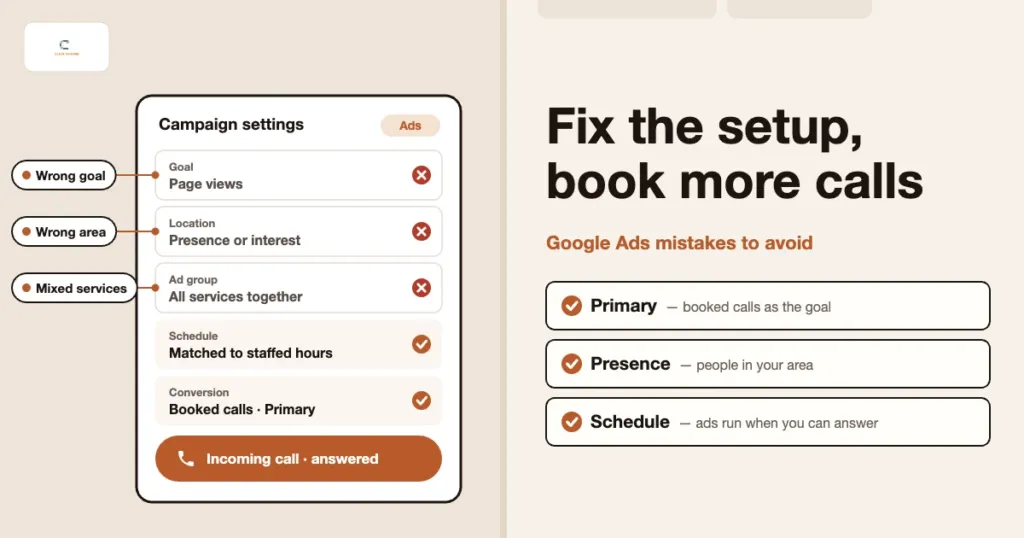
| Optimising to form fills or page views | Conversions climb but booked jobs don’t | Make calls, qualified enquiries and booked jobs Primary; the rest Secondary |
| Several services in one campaign | One service takes most of the budget; ads don’t match searches | Split by service, each with its own budget, ads and page |
| Broad match with weak conversion data | Search terms drift off-topic; cost per conversion swings weekly | Use phrase and exact match until the data is reliable |
| All traffic to the home page | Plenty of clicks, few calls; short mobile visits | Send each ad group to a matching service page |
| “Presence or interest” location option | Clicks and enquiries from outside your area | Switch to “Presence”; check the matched locations report |
| Constant bid and budget changes | Bid strategy often shows “Learning” | One change at a time, reviewed on a set date |
Eight setup mistakes that cost service businesses booked calls
These are in rough order of impact. The first three affect how Google bids on your behalf, so fix those before anything else.
1. Optimising to form fills and page views instead of booked calls
Google Ads lets you mark each conversion action as Primary or Secondary. Primary actions are the ones Smart Bidding optimises towards and the ones counted in the Conversions column. Secondary actions are recorded but don’t steer bidding. Many accounts have page views, button clicks or every form submission set as Primary.
Why it hurts: the algorithm is rewarded for activity, not outcomes. A spam form fill or a three-second hang-up counts the same as a real enquiry, so bidding drifts towards people who browse but never book.
The fix: make calls from ads, website calls above a sensible minimum length and genuine enquiry forms your Primary actions. Move everything else to Secondary. If you can, import booked jobs from your CRM as offline conversions. Our guide to tracking booked calls, not clicks walks through the setup, and scoring lead quality and filtering spam forms keeps junk out of the data.
2. Lumping several services into one campaign
A plumber might offer emergency call-outs, boiler installs and bathroom refits. Put them in one campaign with one budget and the cheapest, highest-volume service usually takes most of the spend, whether or not it’s the most profitable.
Why it hurts: you can’t control budget by service, the ads end up generic, and the search terms report becomes hard to read. High-value jobs get squeezed out.
The fix: split by service, at least at ad group level and ideally at campaign level where services have different values or margins. Each group gets its own keywords, ads that name the service, and its own landing page.
3. Running broad match and Smart Bidding before the data is reliable
Google recommends pairing broad match with Smart Bidding, and with solid conversion data that can work well. With few conversions, or conversions full of spam, broad match reaches into loosely related searches and the bidding has nothing reliable to learn from.
Why it hurts: spend drifts towards research searches, job seekers and DIY queries, and the cost per booked call becomes unpredictable.
The fix: get conversion tracking right first (mistake 1). Until you have steady, trustworthy conversion volume, lean on phrase and exact match with a simpler bid strategy, such as Manual CPC or Maximise Clicks with a bid limit. Then introduce broad match one campaign at a time, with a solid negative keyword list in place. If a campaign used Google’s campaign-level broad match setting, check it too: from September 2026 those campaigns are being moved to AI Max, which also matches loosely related searches.
4. Sending all traffic to the home page
The home page has to speak to everyone, so it rarely speaks well to the person who just searched “emergency electrician near me”. They scan for the service and a phone number, don’t see either quickly, and go back to the results.
Why it hurts: a lower conversion rate means fewer calls for the same spend. Landing page experience is also a factor in Quality Score, so a vague page can make each click cost more.
The fix: send each ad group to the page that matches it, with the service in the headline, a tap-to-call button near the top, proof you work in the searcher’s area and a short form. See landing pages that turn ad clicks into booked calls for what to put on the page.
5. Using “presence or interest” location targeting
Google Ads location options include “Presence or interest”, the default, which reaches people in your area, regularly there, or who have shown interest in it. “Presence” limits ads to people who are in, or regularly in, your area.
Why it hurts: for a business that serves a set area, interest-based traffic often means people searching from somewhere else. They click and sometimes call, but they can’t become customers.
The fix: switch service-area campaigns to “Presence” unless you have a clear reason not to, such as a clinic whose patients travel in. Then check the matched locations view of the Locations report to confirm clicks come from where you actually work.
Test the call path, not just the ad. Once a month, ring the number in your ads from a mobile at a busy time. Note how many rings it takes, what the person says, and whether they could book you in on that call.
6. Running ads when nobody can answer the phone
Ads keep running at lunchtime, after hours and on Saturday mornings while the office is empty. Calls go to voicemail, and many callers simply ring the next business on the list.
Why it hurts: you pay for the click either way. A missed call is demand you’ve already paid for, handed to a competitor.
The fix: set an ad schedule that matches the hours someone is ready to answer. Outside those hours, pause, lower bids, or lead with a form and a clear call-back promise. If you use Google forwarding numbers, the call details report shows which calls were missed, so review it weekly. Fix the handling too: a named person on the phone at peak times and a rule for returning missed calls fast.
7. Changing bids and budgets too often
When results dip for a few days, the instinct is to act: raise the target, cut the budget, switch bid strategy, then change it back. Significant changes can send a Smart Bidding strategy back into a learning period, shown as “Learning” in its status.
Why it hurts: the account never settles long enough to show what it can do. Service businesses have lumpy weeks anyway.
The fix: decide in advance what you’ll review and when. Make one meaningful change at a time, record it in a simple change log, and judge it over several full weeks rather than a few days.
8. Judging success by cost per lead
Cost per lead is easy to report, and easy to game. Broader keywords, cheaper placements and looser forms all lower cost per lead while the number of real jobs falls.
Why it hurts: you steer the account towards cheap, low-intent enquiries and away from the searches that turn into paid work.
The fix: report cost per booked call alongside cost per lead, and let the booked-call figure decide budget. We explain the difference in cost per lead vs cost per booked call.
How to measure the fixes in booked calls
Clicks and click-through rate show whether ads are seen, not whether the fixes are working. Track these instead, the same way every month.
- Cost per booked call. Total ad spend divided by the calls or enquiries that became a booked appointment, visit or job. This is the headline number.
- Lead-to-booking rate. Booked calls divided by all leads from ads. If it falls while leads rise, quality is slipping, often because of broad match or loose conversion goals.
- Answered-call rate. Answered calls from ads divided by all calls from ads. This shows whether call handling (mistake 6) is leaking demand.
- Booked calls by service. Split by campaign or ad group. This shows whether high-value services get their share after restructuring (mistake 2).
To get these numbers you need ads, website and phone data in one place. Our guide to the GA4, call tracking and Google Ads measurement stack shows how the pieces connect. Our analytics and tracking service can set it up for you.
How to audit your own account in an hour
You don’t need an agency to spot most of these mistakes. Open the account, work through this list and write down what you find before changing anything.
- Conversions (10 minutes). Open Goals and check which actions are Primary. Anything that isn’t a call, a qualified enquiry or a booked job should usually be Secondary.
- Campaign structure (10 minutes). Does each campaign or ad group map to a single service? Is one service eating most of the budget?
- Match types and bidding (10 minutes). Note which campaigns use broad match, AI Max and Smart Bidding, and compare that with how many trustworthy conversions each has had.
- Final URLs (5 minutes). Flag any ad group that sends people to the home page.
- Location settings (5 minutes). Confirm each campaign is set to “Presence” and scan the matched locations report for clicks from outside your area.
- Ad schedule and calls (10 minutes). Compare the ad schedule with your staffed hours, then count missed calls in the call details report.
- Change history (5 minutes). See how often bids, budgets and bid strategies have changed in recent weeks.
- Reporting (5 minutes). Check whether anyone reports cost per booked call. If nobody does, fix that first.
If you work with an agency, share your findings with them. Our guide on how to brief (or fire) a Google Ads agency covers turning an audit like this into clear instructions.
FAQs
Should I use broad match at all?
Yes, once your conversion tracking is clean and you have steady conversion volume. Paired with Smart Bidding, broad match can find relevant searches you’d never think to add as keywords. Until then, phrase and exact match give you more control while the data builds.
How long should I wait after changing a bid strategy?
At least until the “Learning” status has cleared, and long enough to see full weeks of weekday and weekend patterns. For most service accounts that means judging over several weeks, not days.
Is a form fill a bad conversion to track?
No. A genuine enquiry form is worth tracking and can be a Primary conversion. The problem is counting every submission, including spam and duplicates, as if it were a booked job. Filter out spam and, where you can, import which form leads went on to book.
Do I need a separate landing page for every service?
Each ad group should land on a page that matches what people searched for, and a strong existing service page often does that job. Build dedicated landing pages for your highest-spend services, or where the service page is cluttered or slow on mobile.
How can ClickOptimo help?
We audit Google Ads accounts for service businesses, fix the setup issues covered here and connect tracking to booked calls. We then run the account against cost per booked call through our Google Ads management, with plain-English reporting each month. Book via /book/.
Next step: run the one-hour audit this week
This week, block out an hour and work through the audit list above. Start with the Goals page: if anything other than calls, qualified enquiries or booked jobs is set as Primary, write it down.
Book a Growth Diagnostic — we’ll review your Google Ads setup, tracking and call handling, and give you a prioritised list of fixes.
More context: LSA vs Search ads · Local SEO and Google Ads together · Seasonal demand planning
growth@clickoptimo.com · +91-8497982579