Table of Contents
- What “mobile-friendly” really means for a service business
- Why mobile-friendly websites matter for SEO
- Why mobile matters for user experience — and booked calls
- The mobile essentials that win booked calls
- How to test your mobile site in 20 minutes
- Measure mobile in booked calls, not bounce rate
- Common mobile mistakes to avoid
- FAQs
- Next step: test your site on your own phone
It is 7.15am and water is coming through someone’s kitchen ceiling. They grab their phone, search “emergency plumber near me” and tap the first few results. One site loads slowly, the phone number is buried in the footer, and the quote form wants eleven fields. The next site shows a big “Call now” button and a line that says “Engineer with you within two hours”. You know which business gets the call.
For most service businesses, that phone screen is now the shop window. People find you on their phone, check your reviews on their phone, and call or book from their phone — often while doing something else. A website that only really works on a laptop is quietly sending those people to a competitor.
This guide is for owners and marketing leads of service businesses — trades, clinics, home services and professional firms — across the US, UK, AU, CA and NZ. It explains why a mobile-friendly website matters for SEO and user experience, the six changes that make the biggest difference to booked calls, and how to test and measure your own site in under an hour.
Your mobile site is not a smaller version of your website. For most service businesses, it is the website.
What “mobile-friendly” really means for a service business
The basic definition is a site that fits a small screen: no sideways scrolling, no pinching to zoom, text you can read. That is the minimum, and most modern themes manage it. For a service business, the real test is different: can a busy, slightly stressed person on a phone find what they need and contact you in under a minute?
That breaks down into five practical checks:
| Check | What good looks like | Why it matters for booked calls |
|---|---|---|
| Fits the screen | No sideways scrolling; images and tables stay inside the screen | Visitors stay long enough to read your offer |
| Easy to contact | Tap-to-call and booking buttons always within thumb reach | Removes the step where most mobile visitors give up |
| Easy to read | Body text around 16px, short paragraphs, clear headings | People find their answer and trust you sooner |
| Fast on mobile data | Main content visible in about 2.5 seconds | Slow pages lose visitors before they see your number |
| Short forms | Three to five fields, with the right keyboard for each | More enquiries completed on a phone |
If your site passes all five on a real phone, you are ahead of many local competitors. If it fails one, that is usually where the leak is.
Why mobile-friendly websites matter for SEO
Google now crawls and indexes websites with a smartphone crawler. This is known as mobile-first indexing, and it means the mobile version of your page is the version Google reads, judges and ranks. If something only appears on desktop, as far as Google is concerned it may as well not exist.
That has four practical effects:
- Same content on mobile and desktop. Do not hide service details, FAQs or location information on mobile to “save space”. Use accordions if you need to, but keep the content on the page.
- Same headings, links and structured data. Page titles, H1s, internal links and schema should match on both versions.
- Page experience counts. Google looks at how fast and stable pages are for real visitors (Core Web Vitals), whether they use HTTPS, and whether intrusive pop-ups get in the way. These rarely beat great content on their own, but between two similar local businesses they can tip the balance. Our guide to Core Web Vitals and page speed covers the fixes.
- Local searches happen on phones. “Near me” and “open now” searches are usually made on a phone, often by someone ready to book. A mobile-friendly site supports your local SEO and Google Maps visibility, because people who tap through from Maps can act straight away.
Google’s Mobile-Friendly Test has gone. Google retired its Mobile-Friendly Test tool and the Mobile Usability report in Search Console at the end of 2023. Use your own phone, PageSpeed Insights and Lighthouse in Chrome instead. The 20-minute test later in this guide shows how.
Rankings are only half the story, though. A mobile page that ranks but does not convert is just more expensive traffic. If your pages have other ranking problems too, see our list of SEO mistakes that hurt rankings.
Why mobile matters for user experience — and booked calls
Mobile visitors behave differently. They are often on the move, on patchy data, using one thumb, and comparing you with two or three other businesses in other tabs. They will not hunt for your phone number or fight with a fiddly form. They will just go back to Google.
That is why the same site can convert well on desktop and badly on mobile. Owners usually look at their website on a large screen in the office, so mobile problems go unnoticed for months. Meanwhile, if most of your ad clicks and Maps visits come from phones, the mobile experience is quietly deciding what you pay for each booked call.
If you run Google Ads, it matters twice over: you pay for every mobile click, whether or not the page lets that person contact you. Pair this guide with our checklist for landing pages that turn service ad clicks into booked calls.
The mobile essentials that win booked calls
You do not need a full rebuild to fix most mobile problems. These six changes make the biggest difference for service businesses, roughly in order of impact.
1. Tap-to-call that is always within reach
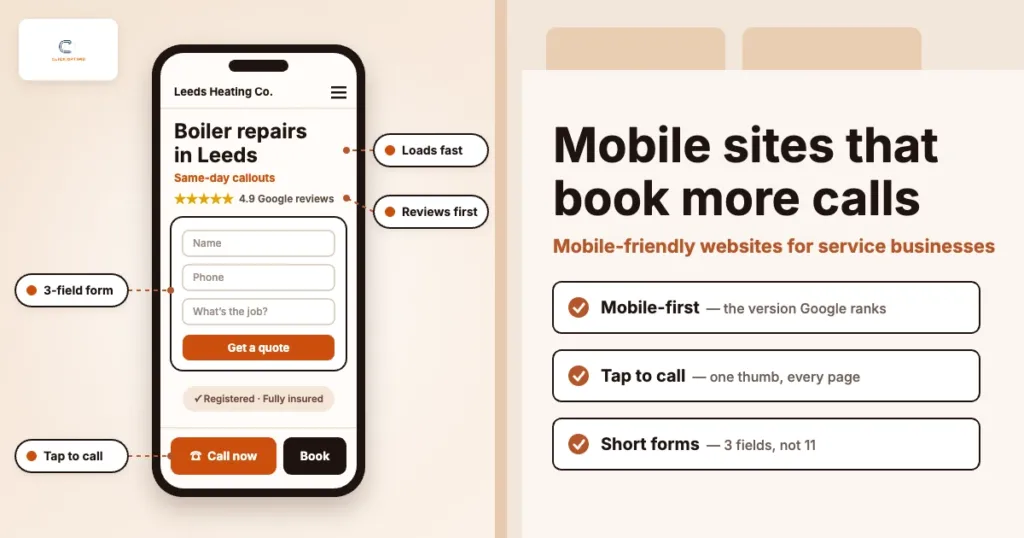
Your phone number should be a tappable link in the header and in a sticky bar or button at the bottom of the screen on mobile. The bottom of the screen is where thumbs naturally rest; the top corner is the hardest place to reach one-handed.
- Label it with an action — “Call now” or “Call for a quote” — not just the number
- Add a second button for people who would rather not call: “Book online” or “Get a quote”
- Show opening hours or response time next to it, so people know someone will answer
- Track every tap as a key event, so you can see which pages and campaigns drive calls
2. Short forms built for thumbs
Every extra field on a phone is another chance to give up. Ask only for what you need to reply: name, phone or email, and a short description of the job. Collect the rest on the call.
- Use the right field types, so phones show a number pad for phone numbers and an @ keyboard for email
- Allow autofill, so browsers can complete name, email and phone in one tap
- Make fields and buttons full width, with labels above the field rather than inside it
- Show a clear thank-you message that says what happens next
If spam form fills are the reason your form is long, solve that separately — see lead quality scoring for service businesses.
3. Readable text and room to tap
Small text and crowded links are the most common mobile complaints. Aim for body text around 16px, line spacing of about 1.5 and short paragraphs. Keep buttons and links at least 44–48 pixels tall, with space between them, so people do not tap the wrong thing.
A useful side effect: form fields with text smaller than 16px make iPhones zoom in when someone taps them, which throws the layout off. Setting form text to 16px stops that.
4. Speed on a real mobile connection
Your office Wi-Fi is not your customer’s connection. Test on mobile data, outdoors, and see how long it takes before the headline and call button appear. The usual culprits on service sites are oversized images, sliders, video backgrounds, and too many plugins or tracking scripts.
Resize and compress images, use modern formats such as WebP, remove sliders, and load chat widgets and other extras after the main content. Our Core Web Vitals guide goes into the detail.
5. Pop-ups and chat widgets that stay out of the way
A pop-up that covers the screen the moment someone lands is annoying on a laptop and a dead end on a phone. Google’s guidance also discourages intrusive pop-ups that block the main content. Keep cookie banners small, delay or remove newsletter pop-ups, and check that your chat bubble does not sit on top of your call button.
6. Trust signals on the first screen
On a phone, the first screen has to do a lot of work. Within one scroll, a visitor should see what you do, where you work, why they should trust you and how to contact you:
- A clear headline with the service and area — “Boiler repairs in Leeds, same-day callouts”
- Your review rating and count, ideally from Google
- Licences, accreditations or insurance where they matter in your trade
- The call and book buttons
If you serve several towns, each location page needs the same treatment on mobile. Your Google Business Profile should point to the page that matches the search, not just the home page.
How to test your mobile site in 20 minutes
You do not need special software — just your own phone and two free tools.
- Search like a customer. On your phone, search for your main service and town. Tap through to your site from Google and from your Google Business Profile.
- Time the first screen. On mobile data, count how long it takes before you can see the headline and a call button.
- Try to contact yourself. Tap to call. Fill in the form with one thumb. Book a slot if you offer online booking. Note anything awkward.
- Check every key page. Home, each main service page, location pages and the contact page — not just the home page.
- Run PageSpeed Insights. Enter your main service page at pagespeed.web.dev and look at the mobile results. Data from real visitors matters more than the lab score.
- Run Lighthouse. In Chrome on a computer, open DevTools, switch to the mobile device view and run a Lighthouse report. It flags small tap targets, accessibility problems and other issues.
- Ask someone else. Hand your phone to a friend who has never seen the site and ask them to get a quote. Watch, and do not help.
Write down every problem, then fix them in order of how close they sit to the call button or the form.
Measure mobile in booked calls, not bounce rate
Bounce rate and time on page tell you little on their own. What matters is whether mobile visitors contact you, and whether those contacts become booked calls.
- Conversion rate by device: in GA4, break your key events — calls, forms, bookings — down by device category. A much lower mobile rate on the same pages is a clear sign of a mobile problem. New to GA4? Start with our GA4 beginner’s guide.
- Call taps and real calls: track taps on your phone links and, if you use call tracking, check how many became real conversations.
- Booked calls from mobile: the number that matters. Our guide to tracking booked calls, not clicks shows how to connect enquiries to bookings.
Measure before you change anything, then again four to six weeks after. That gives you a fair comparison and a clear answer on what the fixes were worth.
Common mobile mistakes to avoid
- Phone number as plain text or an image: if it is not tappable, many people will not bother copying it
- Hiding content on mobile: Google indexes the mobile version, so hidden service details can cost rankings
- Checking changes on desktop only: always look at a new page on a real phone before it goes live
- Sliders and video headers: they slow the first screen and push your offer down
- Chat widget over the call button: check the bottom of the screen on a few phone sizes
- Wide tables and images: they cause sideways scrolling — let tables scroll inside their own box
- Fixing the home page only: most visitors from Google and ads land on service pages. See the signs your website is costing you leads.
FAQs
Does a mobile-friendly website really improve SEO?
Yes. Google indexes the mobile version of your pages, so what appears on mobile is what gets ranked, and fast, stable, easy-to-use pages support page experience. Content and relevance still matter most, but a poor mobile site can hold good content back.
Is a responsive theme enough?
It is a good start, not the finish line. A responsive theme makes pages fit the screen, but it will not add a sticky call button, shorten your forms or remove a heavy slider. Test the full journey from search to enquiry on a real phone.
How can I check my site now that Google’s Mobile-Friendly Test is gone?
Start with your own phone, then use PageSpeed Insights for speed and Lighthouse in Chrome for tap targets, accessibility and other issues. The 20-minute test in this guide covers the checks that matter most for booked calls.
Should we build a separate mobile site or an app?
For most service businesses, no. One responsive website with the same content on every device is simpler to maintain and is the set-up Google recommends. An app only makes sense if customers book with you very often.
How can ClickOptimo help?
A Growth Diagnostic checks your site on real phones, your call and form tracking and your ads, then ranks the fixes by their effect on booked calls. Book via /book/.
Next step: test your site on your own phone
Tonight, search for your main service on your phone, tap through to your site and try to get a quote with one thumb. Time how long it takes and note every point where you hesitated. That list is your mobile to-do list.
Book a Growth Diagnostic — we will check your site on real phones and show which fixes would turn more mobile visitors into booked calls.
More context: Growth Diagnostic · Web design services · SEO services
growth@clickoptimo.com · +91-8497982579