Table of Contents
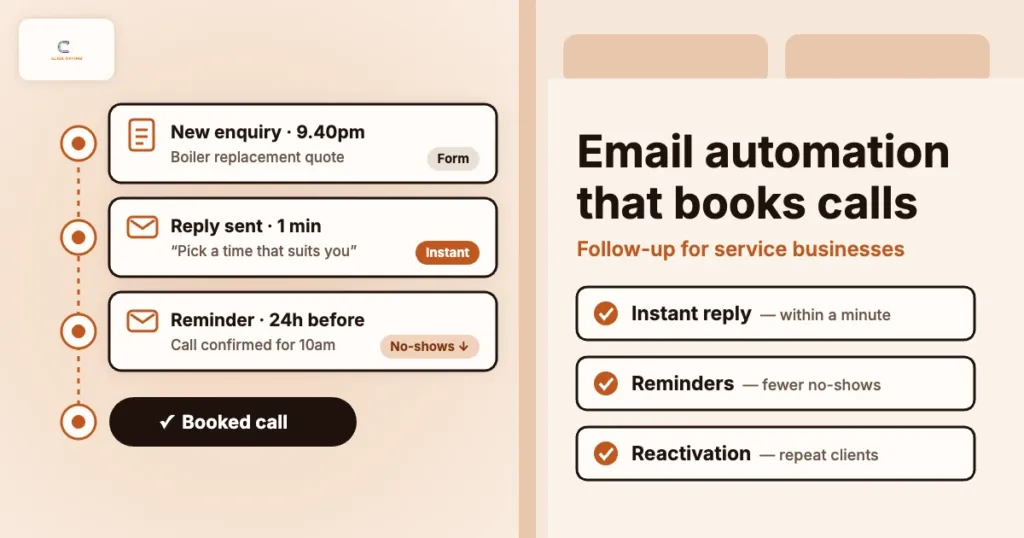
A homeowner fills in your quote form at 9.40pm. A patient asks about an appointment on Sunday afternoon. A business owner downloads your pricing guide between meetings. Each of them has just put their hand up — and in many service businesses, nothing happens until someone gets back to the office.
By then, they have often contacted two other firms. The one that replied first, clearly and helpfully, usually gets the call. That is not an advertising problem or an SEO problem. It is a follow-up problem, and it is one of the cheapest leaks in a lead engine to fix.
Email automation is how you fix it without hiring another person. This guide is for owners and marketing leads of service businesses — trades, clinics, home services and professional firms — across the US, UK, AU, CA and NZ. It covers the five automated emails that matter most, how to set them up with tools you probably already have, and how to measure them in booked calls rather than open rates.
Most service businesses do not have a lead problem. They have a follow-up problem.
What email automation means for a service business
Most advice on email automation is written for online shops: abandoned baskets, product recommendations, discount codes. A service business does not have a basket. What it has is a journey from enquiry to booked call to completed job to repeat or referral — and plenty of gaps along the way where people go quiet.
Email automation simply means a message goes out on its own when something happens — a form is submitted, a quote is sent, an appointment is booked, a job is finished — or when a set amount of time passes. You write the emails once, decide the rules, and the system sends the right message to the right person at the right moment.
Done well, it does three jobs:
- Speed: every enquiry gets a useful reply within minutes, day or night.
- Consistency: follow-ups happen every time, not only when the team remembers.
- Lifetime value: past clients hear from you when they are next likely to need you, instead of searching Google and finding a competitor.
The five automations that matter most
You do not need dozens of sequences. These five cover the moments where service businesses lose the most work:
| Automation | Trigger | Goal | Timing | What to measure |
|---|---|---|---|---|
| 1. Instant enquiry reply | Form submitted or chat lead | Get a call booked while interest is high | Within a minute, then day 1 and day 3 if no booking | Enquiry-to-booked-call rate |
| 2. Quote follow-up | Quote or estimate sent | Answer doubts and win the job | Day 2, day 5, day 10 | Quote acceptance rate |
| 3. Booking confirmation and reminders | Call or appointment booked | Cut no-shows and late cancellations | Instantly, 24 hours before, 2 hours before | Show rate |
| 4. Review and referral request | Job marked complete | More reviews and word-of-mouth | 1–3 days after the job | New reviews per month, referrals |
| 5. Reactivation and service reminders | Time since last job | Bring past clients back | At the next natural service interval | Repeat bookings |
Start with the first and third. They are the quickest to build and usually show results within weeks.
1. The instant enquiry reply
This is the most valuable email a service business can automate. When someone enquires, they are at peak interest. A reply that arrives within a minute — from a real person’s name, not “noreply” — tells them the enquiry landed and what happens next.
A good instant reply:
- Thanks them by name and repeats what they asked about, so it does not read like a template
- Says exactly what happens next and when (“Sarah will call you before 11am tomorrow”)
- Offers a way to book a time straight away, with a link to your booking calendar
- Answers the two or three questions every new enquirer asks: price ranges, areas covered, how soon you can start
- Includes a phone number for anyone who would rather talk now
If no call is booked, send a short follow-up the next day and one more on day three. Then stop. Three helpful messages is persistence; seven is spam. The sequence must also stop the moment they book, which is why the rules matter as much as the words.
Email supports the phone — it does not replace it. For urgent jobs (a burst pipe, a toothache, a legal deadline), a quick call or text from your team will win more work than any email. Use automation to cover the gaps — evenings, weekends, busy days — and to make sure no enquiry is ever left without a reply.
2. The quote follow-up
Many service businesses send a quote and then wait. The customer has questions, gets busy, or compares you with a cheaper firm, and the quote quietly expires. A short sequence after the quote keeps the conversation going without your team chasing by hand.
- Day 2: check the quote arrived and invite questions. Keep it to three lines.
- Day 5: answer the most common objection for that service — what is included, why your price is what it is, how long the work takes — and link to a relevant case study or reviews.
- Day 10: a polite close: “Shall I keep this open or close it off for now?” This one often gets the most replies.
Have the sequence stop when the quote is accepted or declined, and pass replies straight to the person who wrote the quote.
3. Booking confirmations and reminders
Every no-show is a slot you cannot sell again. Confirmation and reminder emails are simple, expected by customers, and cut missed appointments noticeably. Most booking tools — Cal.com, Calendly, practice management systems and field service software — include them, but they are often left on the default wording.
Make them work harder:
- Confirm the date, time, address or video link, and who they will meet
- Say how to prepare: documents to bring, access to the property, questions to think about
- Make rescheduling easy — a rescheduled appointment is far better than a no-show
- Send a reminder 24 hours before, and a short one about two hours before for in-person visits
If your diary relies on discovery or consultation calls, this is also where you set expectations. A clear agenda in the confirmation email makes the call itself shorter and more likely to end in a booked job.
4. Review and referral requests
Happy customers rarely leave reviews unless asked, and they rarely refer you unless reminded. A single email one to three days after the job is finished does both.
- Thank them and mention the specific job, so it feels personal
- Ask for a Google review with a direct link — the fewer clicks, the more reviews you get. Our guide to Google Business Profile for calls explains why reviews matter for Maps visibility.
- Give an easy way to raise a problem privately, so issues come to you before they become a one-star review
- Mention, briefly, that you welcome referrals to friends or neighbours
Ask every customer in the same way. Do not filter who receives the request based on whether you expect a good review; Google’s review policies do not allow selective soliciting, and it tends to backfire.
5. Reactivation and service reminders
Your past clients are the cheapest source of new bookings you have. They already trust you. Most service businesses have a natural reason to get back in touch:
- Annual boiler services, gas safety checks or HVAC tune-ups
- Six-monthly dental check-ups or physiotherapy reviews
- Annual accounts, tax deadlines or contract renewals
- Seasonal work such as gutter clearing, garden maintenance or roof checks
Set a reminder to go out at the right interval, with a one-click way to book. For clients you have not heard from in a year or more, a friendly “still here if you need us” note with something useful — a seasonal checklist, a price update, a new service — often brings a surprising number back. Pair it with ethical remarketing if you also run ads.
How to set it up without a big project
You probably have most of what you need already. The set-up is less about the tool and more about connecting the steps so nothing falls between them.
- Send every enquiry to one place. Website forms, booking tools and chat should all feed a single CRM or inbox, so each person has one record and one sequence. HubSpot, Pipedrive, ActiveCampaign, Brevo and most field service tools can do this.
- Tag the service and source. A boiler repair enquiry needs different follow-up from a full installation. Knowing the source (Google Ads, organic, referral) also lets you report on which channels actually book.
- Write the emails in plain language. Short, from a named person, one clear next step, and easy to reply to. Plain text often beats heavily designed templates for this kind of email.
- Set stop rules. Stop the enquiry sequence when a call is booked, stop the quote sequence when the quote is accepted or declined, and stop everything when someone asks.
- Authenticate your sending domain. Set up SPF, DKIM and DMARC for your domain so your emails land in the inbox rather than spam. Gmail, Yahoo and Outlook.com now require all three from bulk senders (Gmail asks every sender for at least SPF or DKIM), and an unauthenticated “we got your enquiry” email in the spam folder is worse than none.
- Test it as a customer. Fill in your own form, book your own appointment and check every email on your phone before you switch it on.
Consent matters. Replies to an enquiry, booking confirmations and reminders are service messages and are generally expected. Marketing emails — newsletters, offers, reactivation campaigns — need the right permission for where your customers are (for example UK GDPR and PECR in the UK, CAN-SPAM in the US, CASL in Canada, the Spam Act in Australia and the Unsolicited Electronic Messages Act in New Zealand) and a clear way to unsubscribe. If you are unsure, check with your adviser before emailing past clients.
Measure booked calls, not open rates
Open rates are no longer a reliable number — privacy features in Apple Mail and other apps mark many emails as opened whether or not anyone read them. Clicks are better, but still not the point. Measure what your diary feels:
- Time to first response: how long between an enquiry and the first useful reply. Automation should bring this down to minutes.
- Enquiry-to-booked-call rate: the share of enquiries that become a booked call. This is the clearest sign the instant reply is working. Our guide to tracking booked calls, not clicks shows how to measure it.
- Show rate: booked calls or appointments that actually happen.
- Quote acceptance rate: before and after the quote follow-up goes live.
- Repeat bookings and reviews: from reminders and review requests, month by month.
Put these next to your ad spend and you can work out a real cost per booked call — and often find that better follow-up lowers it faster than any change to the ads.
Common mistakes to avoid
- Sending from “noreply”: it tells people not to reply — the opposite of what you want
- No stop rules: chasing someone who has already booked makes you look disorganised
- Too many emails: three useful messages beats seven pushy ones
- Automating spam leads: filter junk form fills first, or your sequences will email bots. See lead quality scoring for service businesses.
- Set and forget: review your sequences every quarter — prices, team names and services change
- Ignoring the landing page: email cannot rescue an enquiry form that never gets filled in. Check the signs your website is costing you leads.
FAQs
How quickly should we reply to a new enquiry?
As quickly as you can — ideally within minutes. An automated reply covers the first minute, day and night, and tells the person exactly when a member of your team will call.
Will automated emails feel impersonal?
Not if you write them like a person would. Use the customer’s name and the service they asked about, send from a named team member, keep them short and make it easy to reply to a real inbox.
Which tool should a small service business use?
Start with what you already have. Many CRMs, booking tools and field service platforms include automation. If you need a separate tool, HubSpot, ActiveCampaign, Brevo and Mailchimp all handle the five automations in this guide.
How many emails should a follow-up sequence have?
For new enquiries and quotes, three is usually enough, spread over about ten days. Every sequence should stop as soon as the person books, accepts or asks you to stop.
How can ClickOptimo help?
A Growth Diagnostic looks at your whole path from enquiry to booked call — forms, follow-up, tracking and ads — and ranks what to fix by its effect on booked calls. Book via /book/.
Next step: time your own follow-up
Fill in your own enquiry form tonight and note how long it takes to get a reply, what the reply says, and whether it gives you a way to book. Then check what happens to a quote you sent last month. Those two tests show you where the first automations should go.
Book a Growth Diagnostic — we will show you where enquiries go quiet and which follow-ups would turn more of them into booked calls.
More context: Growth Diagnostic · Email marketing services · services
growth@clickoptimo.com · +91-8497982579