Table of Contents
- What conversion-focused design means for a service business
- What each page on a service website should do
- Seven design principles that turn visitors into booked calls
- How to brief a designer for a conversion-focused website
- How to measure whether your design works
- Common conversion design mistakes
- FAQs
- Next step: test your most important page
A new website goes live. It looks sharper than the old one, the team likes the colours, and the agency sends a screenshot of a near-perfect speed score. Three months later the phone is no busier than before. Nobody can say whether the redesign made any difference to booked calls, because nobody measured that before or after.
Conversion-focused website design starts from the other end. Instead of asking how the site should look, it asks what a visitor needs to see, believe and do before they pick up the phone or book a slot — and then designs every page around that.
This guide is for owners and marketing leads of service businesses — trades, clinics, home services and professional firms — across the US, UK, AU, CA and NZ. It covers what each page on a service website should do, seven design principles that turn visitors into enquiries, how to brief a designer, and how to tell whether a redesign actually worked.
A service website has one job: get the right people to call or book. Every page, section and button should either move them towards that or get out of the way.
What conversion-focused design means for a service business
Most website design advice is written for online shops, where the sale happens on the site. For a service business, the website rarely closes the sale. Its job is to turn a stranger into a qualified enquiry — a phone call, a booking or a quote request — so your team can do the rest.
That changes what “good design” means. A good service website is not the one with the most features or the cleverest animation. It is the one where a visitor can answer four questions within a few seconds, and then act without effort:
- Do you do what I need? The service, described in the words customers use.
- Do you work where I am? Towns, regions or “nationwide”, visible early.
- Can I trust you? Reviews, accreditations, real photos and named people.
- What happens next? One clear action — call, book or request a quote — and what to expect after it.
If a page leaves any of those unanswered, visitors fill the gap with doubt — and go back to Google to try the next result.
What each page on a service website should do
Conversion design works page by page. Each type of page has a different visitor and a different job, so it needs different elements and a different main call to action:
| Page | Who lands here | Its job | Must-have elements | Main action |
|---|---|---|---|---|
| Home page | Brand searches, referrals, returning visitors | Confirm they are in the right place and route them | Clear headline, services, areas covered, reviews, phone number | Call or book |
| Service page | People searching for a specific job | Win the enquiry for that service | What is included, price guide, process, proof, FAQs | Book or request a quote |
| Location page | People searching for a service in a town | Show you genuinely cover their area | Local jobs, local reviews, travel area, local contact details | Call or book |
| About page | Comparers checking who you are | Build trust before contact | Named team, photos, accreditations, years trading, guarantees | Book a call |
| Contact or booking page | Ready-to-act visitors | Make contact effortless | Short form, phone number, opening hours, what happens next | Submit or book |
Notice that the service page carries the most weight. For most service businesses it gets more search and ad traffic than the home page, so it deserves the most design attention. If your ads point to it, our guide to landing pages that turn ad clicks into booked calls covers paid traffic in more detail, and our guide to location pages that convert covers multi-area businesses.
Seven design principles that turn visitors into booked calls
These principles apply whether you are redesigning from scratch or improving the site you already have. Work through them in order — the earlier ones usually have the biggest effect.
1. Lead with the outcome, not the company
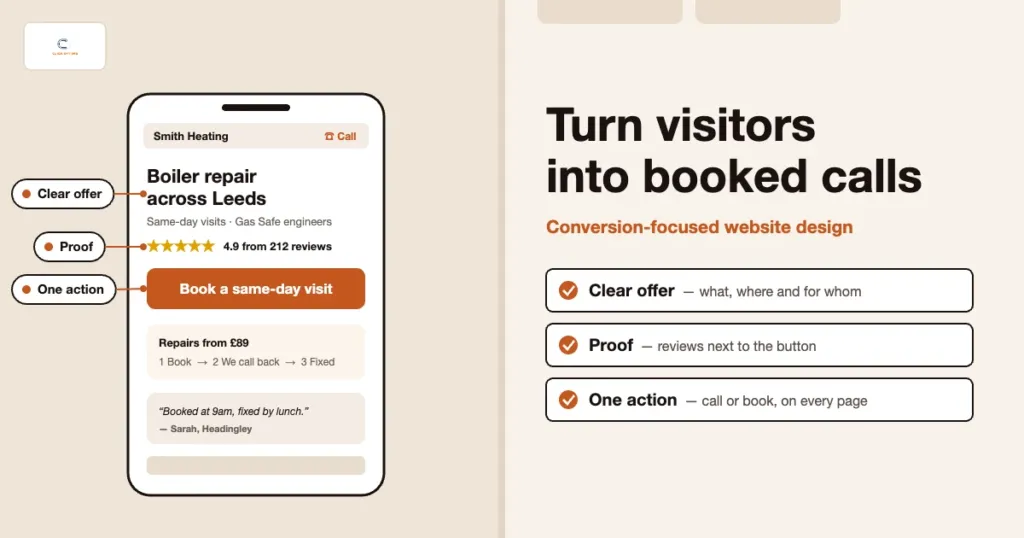
The first screen of every page should say what you do, for whom and where — in plain words. “Emergency boiler repair across Leeds, same day where possible” beats “Welcome to Smith & Sons, your trusted heating partner since 1998”. Put the main action and phone number in that first screen too, so a ready visitor never has to scroll to act.
A quick test: show the first screen to someone outside the business for five seconds, then ask what you do and where. If they hesitate, rewrite the headline before touching anything else.
2. Give every page one main action
Pages with five equally loud buttons — call, email, WhatsApp, download, follow us — convert worse than pages with one main action and one backup. Decide what you want most (usually a booked call or a quote request), make that the bright button, and keep the phone number as the visible backup. Newsletter sign-ups and social links can live in the footer.
Repeat the same main action at natural decision points: after the first screen, after the proof section and at the end of the page. Keep the wording consistent — “Book a free survey” in one place and “Get in touch” in another makes visitors wonder whether they are different things.
3. Put proof next to the decision
Trust is the biggest barrier for most service purchases, because the buyer is letting someone into their home, their health or their business. Reviews hidden on a separate testimonials page do little. Place a short review or rating close to every main button, and add the proof people look for in your sector: accreditations, insurance, guarantees, before-and-after photos or case results.
Use real photos of your team, vans and work wherever you can. Stock photos of smiling models are easy to spot, and they quietly undermine everything else on the page.
4. Be clear about price and process
Many service businesses avoid prices on the website, and visitors notice. You do not need a fixed price list, but a guide — “most boiler services cost £90–£120”, “consultations from £150” — filters out poor-fit enquiries and reassures good ones. Pair it with a simple three or four-step “what happens next”, so people know what they are agreeing to when they get in touch.
5. Make contact effortless on every device
Most service searches happen on a phone, often in a hurry. Phone numbers should be tap-to-call, forms should ask only for what you need to respond (usually name, phone or email, postcode and a short description), and the booking widget should load without errors on mobile data. Our guide to mobile-friendly websites includes a 20-minute phone test you can run today.
6. Make pages fast and easy to scan
Visitors scan before they read. Use short paragraphs, descriptive subheadings, bullet points for what is included, and enough white space that the main button stands out. Keep pages light: compress images, avoid auto-playing video in the first screen and limit third-party scripts. Slow pages lose people before they see your offer — our guide to Core Web Vitals and page speed shows what to check.
7. Remove distractions on the path to contact
Every extra link, pop-up and chat widget is a chance for a visitor to wander off. Keep the main menu short, avoid pop-ups that appear before someone has read anything, and make sure chat tools do not cover the call button on mobile. On booking and contact pages, strip the page back to the form, the phone number and a line of reassurance.
Measure before you redesign. Record at least four to eight weeks of booked calls, form enquiries and conversion rate by page before you change anything. Without a baseline, nobody can tell whether the new design helped — and good-looking redesigns sometimes convert worse than the site they replaced.
How to brief a designer for a conversion-focused website
Most disappointing redesigns start with a brief that is all about looks. A conversion-focused brief gives the designer what they need to design for enquiries:
- Goal and numbers: the main action, current monthly enquiries and booked calls, and the conversion rate of your key pages.
- Customers: who your best clients are, the questions they ask on the phone and the doubts that stop them booking.
- Priority pages: the service pages that bring the most valuable work, in order.
- Proof: reviews, accreditations, photos and case results the designer can use.
- Must-keep items: URLs that already rank well, tracking tags, and integrations such as call tracking and booking tools.
- How success will be judged: booked calls and cost per booked call, not just how the home page looks.
Ask to see mobile layouts first, not last. If the designer presents desktop mock-ups only, the mobile experience — where most of your visitors are — becomes an afterthought.
How to measure whether your design works
Judge a website by the enquiries it produces, not by compliments. At minimum, track phone calls from the site, form submissions and bookings, and record which page each one came from. Then compare the same numbers month by month:
- Conversion rate by page: enquiries divided by visits for each key page. The weakest high-traffic pages are your first candidates for changes.
- Booked calls by source: organic search, Google Ads, Google Business Profile and referrals, so you know which traffic the site converts well.
- Lead quality: the share of enquiries that are genuine, in your area and for services you offer.
- Cost per booked call: for paid traffic, the number that tells you whether design changes are paying off.
Our guide to tracking booked calls, not clicks explains the set-up, and the GA4 beginner’s guide shows where to find page-level numbers. If spam enquiries are inflating your figures, see our guide to lead quality scoring.
Common conversion design mistakes
- Designing for the owner, not the customer. Company history and mission statements at the top, with services buried below.
- One generic services page. Lumping every service onto one page makes it harder to rank, and harder to convert, for any single job.
- Hiding the phone number. Showing it only on the contact page, or as an image that cannot be tapped.
- Long forms. Asking for budget, full address and preferred date before someone has spoken to you.
- Changing URLs without redirects. Losing rankings for pages that were already bringing in work. Our list of SEO mistakes covers this.
- Launching without tracking. Dropping call tracking or conversion tags in the rebuild, so results go dark just when you need them.
If you suspect your current site is already leaking enquiries, our checklist of 10 signs your website is costing you leads is a quick place to start.
FAQs
What is conversion-focused website design?
It is designing a website around the action you want visitors to take — for a service business, usually a call, a booking or a quote request. Every page is planned around what visitors need to see and believe before they act, and success is measured by enquiries and booked calls rather than looks.
What is a good conversion rate for a service business website?
It varies widely by sector, traffic source and page. Rather than chase an industry average, measure your own conversion rate by page and source, then improve the weakest high-traffic pages first. Paid traffic to a focused service page usually converts better than general visits to the home page.
Do I need a full redesign to get more enquiries?
Often not. Clearer headlines, one main action, proof near the buttons, tap-to-call numbers and shorter forms can lift enquiries on the site you already have. A full redesign makes sense when the site is slow, hard to update or cannot support a separate page for each service.
Should I show prices on my website?
A price guide or “from” price usually helps. It filters out enquiries that were never going to fit and reassures people who are ready to buy. If every job is different, explain what affects the price and give typical ranges.
How can ClickOptimo help?
A Growth Diagnostic reviews your key pages, tracking and enquiry path, then ranks the fixes by their effect on booked calls. If you need new pages or a rebuild, our web design service builds them around the same goal. Book via /book/.
Next step: test your most important page
Pick the service page that brings your most valuable work. Open it on your phone and check four things: does the first screen say what you do and where, is there one clear main action, is there proof next to it, and can you call with one tap? Fix whatever fails first, then track enquiries from that page for the next month.
Book a Growth Diagnostic — we will review your key pages and tracking, and show you which changes are most likely to bring more booked calls.
More context: Growth Diagnostic · Web design services · Analytics and tracking services
growth@clickoptimo.com · +91-8497982579